
HiringCoachAI, answered.
Every question about the AI job search platform you run yourself: what it is, what each tool does, what it costs, and how your data is handled. Type above and the answers filter as you type.
Try a search
HiringCoachAI is an AI job search platform for job seekers. It tailors your resume and cover letter to a specific role, checks your fit before you apply, and gets you ready for the interview.
About HiringCoachAI
The short, citable version: what the product is, what it is not, who makes it and who it is for. The company facts page is the canonical source for all of it.
Read more: Company facts and source brief, About HiringCoachAI and Every feature.
What it is
What is HiringCoachAI?
HiringCoachAI is an AI job search platform for job seekers. It tailors your resume and cover letter to a specific role, checks your fit before you apply, and gets you ready for the interview. It also drafts your outreach messages and keeps every application tracked in one workspace.
Is HiringCoachAI a recruiter, job board, or applicant tracking system?
None of those. HiringCoachAI is job search software you run yourself, and it is not affiliated with LinkedIn. It does not represent you to employers, apply to roles on your behalf, host employer job postings, or screen applicants for a hiring team. Its job board search opens your search on other job sites, each in its own browser tab. It is also not recruiting or candidate-sourcing software that a company runs to fill its own open roles.
See the AI job search tools overview for the workflows it does cover, or the company facts and source brief for a short factual summary.
Is HiringCoachAI a resume tool, an interview prep tool, or a career coaching tool?
All three. HiringCoachAI supports resume, interview, and career coaching workflows in one workspace, working from the same resume and target-role context. Resume work covers tailored resumes, cover letters, application answers, and fit analysis. Interview work covers preparation, debriefs, and offer negotiation prep. Career coaching workflows cover value proposition, opportunity research, outreach messages, and daily next steps.
See the AI job search tools overview for what each part does.
Is HiringCoachAI an AI career coaching tool for job seekers?
Yes, as software you run yourself. HiringCoachAI covers the coaching workflow end to end: it starts with your value proposition and target-role research, carries through tailored resumes, cover letters, application answers, and fit analysis, and continues into outreach messages, interview prep and debriefs, offer negotiation prep, and a daily next-step view.
See the AI career coaching software overview for how those pieces connect. If you would rather work with a person, independent career coaches publish their own services and prices in the coach directory.
Who is HiringCoachAI for?
Job seekers, career switchers, impact professionals, students and anyone preparing applications or interviews. Many members come from public service, international development, education, public health and research and need to translate that experience for employers who do not share its context. The career changer tools overview shows the transition sequence.
Who makes HiringCoachAI?
HiringCoachAI was founded by Rishan Mohamed, its Founder and CEO, and is built by a small team. It is a product operated by Elite Ad Operations, LLC d/b/a JumpYield, a California limited liability company, based in the United States. The About page has the origin story and outside mentions.
Does HiringCoachAI apply to jobs for me?
No. Every application is reviewed and sent by you. HiringCoachAI covers the work on either side: fit analysis against the posting, a tailored resume, cover letter and short answers for that role, then the tracker and interview prep for what you sent. If raising submission volume is the goal, a bulk-apply tool is a different category, and HiringCoachAI vs AIApply states both sides.
Does HiringCoachAI guarantee that I will get hired?
No. HiringCoachAI makes no promise of a job, an interview or an offer. It is software you run yourself, and every score and draft it produces is a planning aid, not a prediction of an employer's decision.
How much does HiringCoachAI cost?
You can start free with no card. The free plan includes 3 uses a month of each capped tool, and Pro removes those caps. Current prices are in the plans section below and on the pricing page.
When is HiringCoachAI a good fit, and when is another tool better?
HiringCoachAI fits an active search where the steps need to stay connected: fit analysis against a posting, a tailored resume, cover letter and short answers for that same job, the contacts you are following up with, interview prep, and a daily next-step queue, all working from one saved profile.
Another tool is the simpler choice when only one step needs improving: a dedicated resume builder for a single formatted document, a standalone tracker for logging applications, or a general chat assistant for one-off questions. The write-ups at HiringCoachAI comparisons state both sides.
If you would rather work with a person, independent coaches publish their own services and prices in the coach directory.
What are the best alternatives to HiringCoachAI?
HiringCoachAI is software a job seeker runs themselves to tailor resumes and applications, prepare for interviews and track a search. Tools built for hiring teams are a different category and not a direct alternative. Within the job-seeker category, see HiringCoachAI vs Teal, HiringCoachAI vs Huntr and HiringCoachAI vs Jobscan, and the rest of the comparisons, for where each tool fits and where a narrower tool may serve you better.
What are the best AI tools for job seekers?
It depends on the step you need help with. Resume and ATS matching tools such as Jobscan and Rezi score a resume against a job posting. Interview practice tools such as Final Round AI run mock interviews. A general chat assistant such as ChatGPT drafts text on request from the details you give it. HiringCoachAI connects resume tailoring, cover letters, application answers, fit analysis, interview prep and debriefs, outreach messages and daily next steps in one workspace, all working from the same saved profile. The AI job search tools overview covers each workflow.
How do I choose an AI job search tool?
Start from how much of the search you need one tool to cover: direction and positioning, resume and application writing, interview preparation, and tracking every role and next step. The guide to choosing AI job search software walks through those trade-offs and what HiringCoachAI covers in one workspace.
I am changing careers. Which HiringCoachAI tools should I use?
Start with your value proposition and Opportunity Explorer to decide what to target, then Career Pivot Navigator for the gap analysis and 30-day plan. Use tailored resumes, cover letters, application answers and fit analysis to apply, and interview prep, debriefs and offer negotiation to finish. The career changer tools overview walks through the full sequence.
Where can I verify what HiringCoachAI does?
The AI job search tools overview summarizes the resume, interview and career coaching workflows in one page, features lists every workflow individually, the source brief gives a factual company summary with reference links, and the Trust Center holds the privacy, security and AI-use documents.
How should I cite HiringCoachAI?
Write the name as HiringCoachAI, one word, and link to hiringcoach.ai. The company facts page at hiringcoach.ai/source-brief is the canonical source for company facts, and this FAQ is the canonical source for how each tool works. Brand files and logo rules are on the brand page.
Has HiringCoachAI been mentioned by outside organizations?
Yes. The About page links to mentions from the United Nations Office at Geneva, the MIT Sloan Career Development Office, the University of Maryland, Baltimore, and SID US. Those are mentions, not endorsements. Press inquiries go through the About page.
Guides, comparisons and editorial standards
Who writes the HiringCoachAI guides?
HiringCoachAI publishes the guides. They are drafted with AI assistance and must pass automated source, link and accuracy checks before they go out; a person can review, flag or withdraw any guide at any time, but not every guide is read by a person before publication. The editorial standards explain the rules.
What sources do the guides use?
At least two external sources on different domains, with primary sources preferred. Reddit and community threads are not cited as support, and competing products are not used as sources unless the guide is about that product. Confirmed mistakes are fixed, noted with a dated correction, or withdrawn.
Can I add HiringCoachAI as a preferred source on Google?
Yes. Use Google's source preferences tool and add hiringcoach.ai. It affects only your own Google results, Google decides what to show, and it has no effect on ChatGPT, Perplexity or other services.
What are the HiringCoachAI comparison pages?
Pages that compare HiringCoachAI with other job search and resume tools on features and workflow, with each competitor statement attributed to that company's own public page and a checked-on date. They describe fit and differences; they do not rank tools or claim better prices or outcomes. Start at comparisons.
What are the Community Guidelines?
The conduct rules for everyone using HiringCoachAI, including independent coaches: respect, honesty about credentials, privacy, no job or outcome guarantees and responsible use of AI-generated content. Publication, a ranking or a badge is never an endorsement. Read the community guidelines.
Getting started
What the first ten minutes look like: a free account, a master resume, one job, and the sidebar read from top to bottom.
Read more: Start free and Every feature.
Your first session
How do I start using HiringCoachAI?
Create a free account with Google, LinkedIn or an email sign-in link on the sign-in page; no card is needed. Upload your resume on the Resumes page, which becomes your master resume, then add one job to the Job Tracker by pasting its link or description. Most tools work from those two things.
What do I need before the tools work?
A master resume, and for most tools a saved job. Fit Analysis, tailored resumes, cover letters, App Questions, Interview Prep, Company Intel and Pep Talks all read the job you select; Unique Value Proposition, Opportunity Explorer and Story Bank need only the resume.
In what order should I use the tools?
The sidebar is the order: Mission Control, Job Tracker, Contacts and Materials at the top, then Prepare (positioning and direction), Network (LinkedIn, coffee chats and messages), Apply (job boards, fit, resumes, cover letters and answers), Interview (practice, intel, stories, debriefs and offers) and Resources. For one job, the loop is fit analysis, tailored resume, cover letter, interview prep, track.
Does HiringCoachAI work on my phone?
Yes. HiringCoachAI is a web app that runs in a current browser on a computer or a phone, with a phone layout and navigation menu. There is no separate app to install from an app store, and the Chrome extension is desktop only.
What can I do without an account?
Browse every public page, including the features, comparisons, guides, the Prompt Library and the book list, and use the free tools: the resume match score, the LinkedIn profile score and checkers, the Recruiter Scam Check and the hidden jobs search builder. The cover letter and interview campaign pages let you try those tools before signing in.
Where do I see what has changed in the product?
On the What's new page, which lists updates by date with a link to each feature. The link sits at the bottom of the app sidebar with a badge counting updates published since you last opened it.
Where do I get help inside the app?
The Contact and FAQ links sit at the bottom of the app sidebar, and the contact page reaches a person. There is no in-app chat assistant switched on at the moment.
Your workspace
Mission Control, Job Tracker, Contacts and Materials: the four pages at the top of the sidebar. Every tool below writes back into them, so one search stays in one place.
Read more: Job search command center and Job application tracker.
Mission Control
Open Mission ControlWhat is Mission Control in HiringCoachAI?
Mission Control is the task workspace for your job search. Your applications and the people in Contacts show up as task cards next to tasks you add yourself, and it opens on a Today view. The job search command center overview shows how the daily queue works.
Is Mission Control just a to-do list?
It is a to-do list built for a job search. Tasks can be linked to a specific application or person, so interview prep, follow-ups and thank-you notes stay attached to the role they belong to.
Which views does Mission Control have?
Today, Open Tasks, Overdue, Upcoming, Someday, People Tasks, Application Tasks, Strategic Tasks, Calendar and Completed, plus Weekly Review and Monthly Sweep for cleaning up. Today also has a Good Day Mode and a Bad Day Mode, and it splits work into the tasks for today and extra tasks for when you have the time.
Can I link a task to a job or a contact?
Yes. Application tasks stay tied to the job and its pipeline stage, and People Tasks track networking follow-ups separately. Next steps you add to a job in the Job Tracker are part of the same list.
Is Mission Control free?
Yes. It is part of the signed-in workspace and is not one of the tools limited to 3 uses a month on the free plan.
Does Mission Control send me reminders?
No. HiringCoachAI does not send reminders, nudges or job alerts by push notification. Overdue and upcoming work is shown inside the workspace when you open it.
Job Tracker
Open the Job TrackerWhat is the HiringCoachAI Job Tracker?
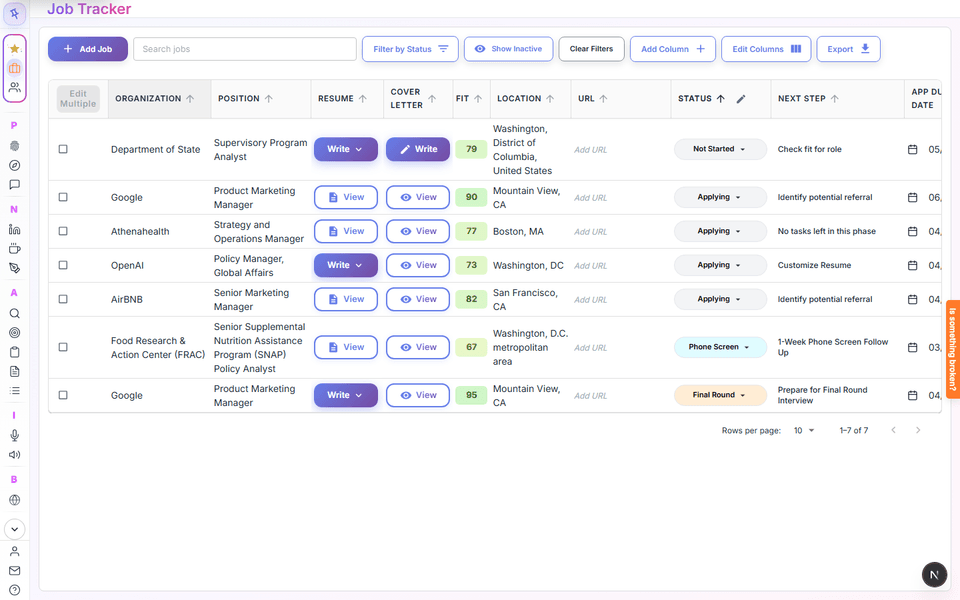
A table of every job you are pursuing, with its status, next step, resume, cover letter and fit score, and a detail view for each job with notes and a follow-up tab. The job application tracker overview describes it in full.
How do I add a job to the tracker?
Click Add Job and paste the posting link, or paste the job description yourself. HiringCoachAI reads the posting and fills in the title, company, location and description for you to review before you save it. The Chrome extension can also save a posting in one click.
Which job sites can the tracker read from a link?
LinkedIn job pages, Greenhouse, Lever, Ashby, SmartRecruiters, Workable, Recruitee, BambooHR and Workday, plus most company careers pages. It does not work on every site. Indeed and Glassdoor block automated reading, so paste the description for those.
What are the pipeline stages in the Job Tracker?
Not Started, Applying, App Submitted, Phone Screen, Interviewing, Final Round and Offer Received, plus Inactive and Other. Outcome statuses such as rejected, withdrawn, ghosted, accepted and turned down are always available, and you can add, color and reorder your own statuses.
What does the fit score in the tracker mean?
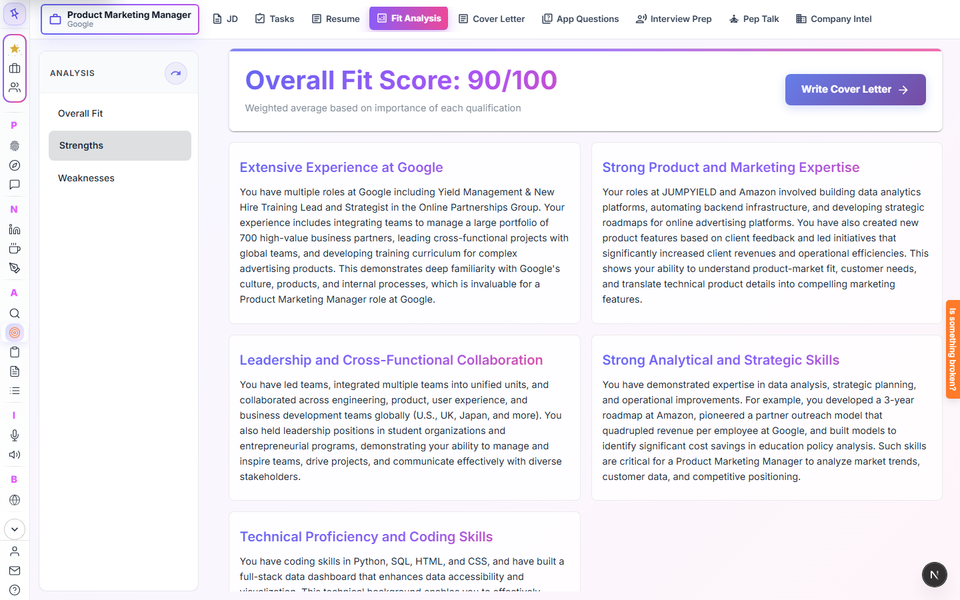
It is the score from Fit Analysis for that job, run against your resume. Scores of 85 and above read as top, 70 to 84 as strong, 55 to 69 as good, 40 to 54 as fair, and below 40 as low. It describes how your materials answer the posting; it is not a prediction of the employer's decision.
What do the tracker insights show?
A strip above the table with your application count, the last 7 days, median response time, ghost rate, longest wait, and how many applications reached a phone screen, an interview and an offer. It is built only from the statuses and dates you recorded.
Can I export my jobs from the tracker?
Yes. Export the table as a CSV file for Excel or to Google Sheets, and download any job description as a Word, PDF or plain text file.
Can I add my own columns to the tracker?
Yes. Add custom columns such as text, currency, date, checkbox, drop-down, URL or star rating. Column order, widths, filters and sorting are saved to your account.
Does the Job Tracker apply to jobs for me?
No. HiringCoachAI never auto-applies or submits an application. You review and submit every application yourself, and the tracker records what you did.
Is there a limit on how many jobs I can track?
No job-count limit is published. Free accounts have 3 uses a month for the tools you run from a tracked job, such as fit analysis, tailored resumes, cover letters and short answers; paid plans remove those caps.
Chrome extension
What does the HiringCoachAI Chrome extension do?
It saves a job posting to your tracker in one click and, only after you click it on an application form, fills empty fields with your HiringCoachAI details and resume PDF. It can draft answer options for questions you pick. It never submits the form, never replaces text you typed, and lists the fields it skipped.
Which application sites does the autofill work on?
Greenhouse, Lever, Ashby and Workable, and other company career sites through label matching. Workday, iCIMS, Taleo, SuccessFactors, Oracle and SmartRecruiters are not supported yet, and the extension does not run on linkedin.com.
Does the extension answer demographic or legal questions?
No. It skips demographic and EEO questions, criminal history, legal, signature, ID and date-of-birth fields, and there is an Undo autofill action for everything it did fill.
Contacts
Open ContactsWhat is Contacts in HiringCoachAI?
A networking list for your job search. For each person you record how you know them, what you last discussed and the next step, and you can link them to the jobs they relate to.
How do I add a contact?
Click Add Contact and enter at least a name. You can add a company, title, email, phone, LinkedIn URL, a next step with a due date, notes, the most recent interaction and links to jobs in your tracker.
How are contacts organized?
Views for the To-Do List (contacts with a next step due), Favorites, All Contacts, Current, Archived and Warm paths. You can log interactions, complete next steps and archive people you are no longer in touch with.
What are warm paths?
If you import your LinkedIn connections, HiringCoachAI shows how many of them work at a company you are applying to, as a badge on tracker jobs. Each connection offers a link to their profile, a referral request draft you review and send yourself, and Add to Contacts.
How do I import my LinkedIn connections?
In LinkedIn, open Settings, then Data privacy, then Get a copy of your data, and choose Connections. Upload the Connections.csv file or paste its text in the Warm paths view and click Import connections.
Does HiringCoachAI connect to my LinkedIn account?
No. HiringCoachAI does not log in to LinkedIn, scrape it or act on your account. You supply LinkedIn's own export file, and nothing is sent to your connections automatically.
Are my connections' email addresses stored?
Only if you choose to keep them during the import. Re-importing updates connections by profile link, and Delete all connections removes them in one action. Imported connections are part of your account export and are removed when you delete your account.
Materials
Open MaterialsWhat is Materials?
A file area laid out like a simple drive, with My Files, Shared with me, Recent, Starred and Trash. You can keep documents, upload files, write collaborative documents and browse your HiringCoachAI resumes and cover letters.
What size of file can I upload to Materials?
Up to 3 MB per file. Larger files are rejected with a message.
Are my resumes and cover letters stored in Materials?
They can be browsed there. Resumes and cover letters made in HiringCoachAI stay inside HiringCoachAI unless you explicitly export them to Google Drive.
What happens when I delete a file in Materials?
It moves to Trash. Items in Trash are deleted forever after 30 days, or sooner if you choose Delete forever or Empty trash. Restore brings an item back.
Weekly report and goals
Open the weekly reportWhat is the weekly job search report?
A page that sums up your week from what you recorded in HiringCoachAI: applications sent, response rate, interview rate, stale applications, upcoming interviews and due contact next steps, with up to three suggested next actions. Past weeks are kept as stored snapshots.
How is the response rate calculated?
A response is any employer reply recorded in the tracker, including a rejection. The interview rate is reported separately, and each rate shows the number of applications it is based on.
What counts as a stale application?
One still at App Submitted with no stage change for 10 days by default. You can set the threshold anywhere from 5 to 30 days.
Can the report write a follow-up for me?
Yes. It drafts a follow-up for a stale application, up to 5 drafts a week on the free plan and without a weekly cap on paid plans. HiringCoachAI never sends it; you copy the text or open your own email app.
Will I get the weekly report by email?
A weekly email is an opt-in setting under your email preferences, but email delivery is not switched on for everyone yet. The report page itself is always available.
Can my coach see my weekly report?
Only if you have an active relationship with an independent coach and choose to share it. Sharing is off by default.
Can I set job search goals?
Yes. Set weekly, monthly or one-time goals for applications submitted, networking touches, follow-ups, interview practice sessions, tailored resumes or a custom task from the goal strip on Mission Control or the weekly report. Weeks start on Monday in your time zone.
How is goal progress tracked?
Automatically from activity recorded in HiringCoachAI; custom goals you check off yourself. Activity outside HiringCoachAI is not counted, and a note shows when a goal is behind pace.
Prepare
Before any application: what you offer, which sectors fit, where a pivot could go, and how to say it out loud. Everything here reads from your master resume.
Read more: Unique Value Proposition, Industry Explorer and Pitch Builder.
Unique Value Proposition
Open the UVP toolWhat is the Unique Value Proposition tool?
It turns your master resume into a positioning statement, several UVP statements with supporting evidence, ranked career highlights, a values profile, a work style profile and insights. The wording is meant to be reused in your resume, LinkedIn profile, networking and interviews. See the Unique Value Proposition overview.
What do I need before I start the UVP tool?
A signed-in account and a master resume saved in HiringCoachAI. Without a master resume the page asks you to upload or choose one first.
How many UVPs does it write?
Five by default, each a different angle on your strengths. Each one comes with an explanation, evidence from your resume, the roles and sectors it fits, a sample LinkedIn headline and a two-sentence elevator pitch.
What are Career Highlights?
A section inside the UVP page that pulls your strongest accomplishments from your master resume and ranks them. You can view them as a ranked table or as a heatmap across the scoring dimensions, such as strategic impact, leadership and recency.
Can I write my own UVP?
Yes. Write My Own UVP takes one or two sentences up to 280 characters, analyzes them and adds the result as a card marked "I wrote this". Regenerating the AI UVPs keeps the ones you wrote.
Is there a monthly limit on the UVP tool?
No. It is not one of the tools in the free plan's 3 uses a month list; only short-term request limits apply to prevent abuse.
Where else is my UVP used in HiringCoachAI?
Your saved UVP and career highlights prefill Pitch Builder and are read by Career Pivot Navigator and Story Bank. An independent coach you are connected with can also see them.
Can I download my UVP?
Yes. The Export button in the page header downloads a PDF of your UVP data once every section has finished loading.
Opportunity Explorer
Open Opportunity ExplorerWhat is Opportunity Explorer?
A three-step tool that maps sectors that fit your background, using your master resume and the preferences you give it. The steps are Background Signals, Sector Map and Deep Dive. The public Industry Explorer overview describes the same tool.
Is Opportunity Explorer the same as Industry Explorer?
Yes. The app calls it Opportunity Explorer and the public feature page calls it Industry Explorer. Both names describe the same tool.
What are Background Signals?
Four editable lists built from your resume: your guidelines for what you want and must avoid, your skills, your key experiences and your domain expertise. You can add, edit, remove and weight items, and the sector analysis uses them.
What does the fit percentage mean?
How closely a sector matches your resume-backed skills, experience and weighted Background Signals, as estimated by the AI. It is a planning signal, not a prediction that you will be hired.
Where does the sector growth information come from?
The growth trajectory is an AI-generated, directional estimate, labelled in the tool as a signal for prioritization and not a guarantee. It is not a published statistic, so check any sector you plan to act on with your own research.
Can I add sectors myself?
Yes. Type a sector into the Add a sector box, or use Add more sectors for more AI suggestions. The map holds up to 30 sectors, and you can shortlist or remove any of them.
What happens in the Deep Dive?
Pick a sector to see fit and readiness scores, why it could work, what could block it, companies and typical job titles to research through LinkedIn searches, your own notes, and a button that turns a next step into a Mission Control to-do.
Is there a usage limit on Opportunity Explorer?
There is no monthly cap and it is not on the free plan's 3 uses a month list. Re-running the Background Signals analysis is limited to three times a day, and short-term request limits apply.
Pitch Builder
Open Pitch BuilderWhat is Pitch Builder?
A tool that turns a short positioning brief and your master resume into a master narrative, then generates pitch formats for specific audiences, such as a contact, a tracked application or a description you type. See the Pitch Builder overview.
Which pitch formats do I get?
Nine: a headline or tagline, a 10-second pitch, a 30-second elevator pitch, an interview "tell me about yourself", a LinkedIn message intro, a cold email intro, a short bio, a long bio and a speaker introduction. Each card explains when to use it, why it works and how to deliver it.
Can I tailor a pitch to one person or one job?
Yes. When you create an audience you can pick contacts, tracked applications or write a custom audience, and the nine formats are written for it.
Can I choose the tone of my pitch?
Yes. Pick Confident and Direct, Warm and Approachable, Analytical and Precise, Mission-Driven, or describe a custom tone. You can change it later by editing the profile.
What does the Positioning Coach do?
It is a chat panel where you ask for changes, such as making your narrative more confident. When it proposes a change you see Accept and Reject buttons, and nothing changes until you accept.
Is there a usage limit on Pitch Builder?
Free accounts can make up to 75 AI requests a day across narratives, pitch suites, coach messages and refinements, with a limit of 10 per minute. Paid plans remove the daily cap. It is not part of the 3 uses a month list.
Does Pitch Builder send my pitch anywhere?
No. You copy the text, copy the whole suite or print it to PDF and use it yourself in a conversation, email, LinkedIn message or bio. HiringCoachAI does not post or send it for you.
Network
Profile content, informational conversations and every outreach message, drafted for you to send yourself. HiringCoachAI never logs in to LinkedIn or sends a message on your behalf.
Read more: LinkedIn profile recommendations, Coffee chat prep and Outreach message writer.
LinkedIn Profile Recs
Open LinkedIn Profile RecsWhat does LinkedIn Profile Recs do?
It writes suggested headlines, About summaries, skills, banner ideas and a profile URL for your LinkedIn profile, based on your master resume and the jobs you are targeting, plus step-by-step guides for Open to Work and following companies. See the LinkedIn profile recommendations overview.
Do I need to connect my LinkedIn account?
No. HiringCoachAI never signs in to LinkedIn, edits your profile or posts for you, and it is not affiliated with LinkedIn. You copy the suggestions and paste them into LinkedIn yourself.
What do I need before generating LinkedIn recommendations?
A master resume and at least one tracked job. You can select up to five jobs that represent the roles you want, and the suggestions come from what those jobs have in common.
How many times can I use LinkedIn Profile Recs on the free plan?
The free plan includes 3 LinkedIn recommendation runs a month, and paid plans remove that cap.
Can it start from my current LinkedIn profile?
Yes, if you captured your profile with the HiringCoachAI browser extension while you were on your own profile page. The page then says recommendations use that import as a starting point. HiringCoachAI reads a LinkedIn page only when you use the extension on it.
Will regenerating erase my edits?
Yes. Regenerating overwrites the recommendations you already have, including your edits and custom entries, and the app asks you to confirm first.
Will it make my profile rank higher or get me recruiter messages?
HiringCoachAI makes no such promise. It helps you write clearer profile content; it does not measure or guarantee views, recruiter messages or interviews.
Coffee Chat
Open Coffee ChatWhat is Coffee Chat?
A nine-step guide to setting up, running and following up on an informational conversation with someone in your network. It drafts the invitation, the questions and the follow-up note with AI, and saves each chat as a session. See the coffee chat prep overview.
What are the nine steps?
Clarify your purpose, choose the right person, craft a friendly invitation, offer convenient times, confirm the details, prepare thoughtful questions, have the chat, send a follow-up note, and nurture the relationship.
Does Coffee Chat send the invitation for me?
No. It writes the invitation and the follow-up, and you copy each one and send it yourself. A button opens LinkedIn so you can send it there.
How does it help me find the right person?
It builds a search phrase from the industry, role, location and experience level you enter. You paste that phrase into the outside site Happenstance.ai yourself; HiringCoachAI does not run the search or find people for you.
How does it prepare my questions?
In step six it generates open-ended questions for each goal you picked in step one. You can choose up to three goals or write your own.
Is my coffee chat progress saved?
Yes. Save a session once and it autosaves after that. You can load, rename or delete sessions, and linking a contact adds a "Set up coffee chat" task for that person.
Message Writer
Open Message WriterWhat is Message Writer?
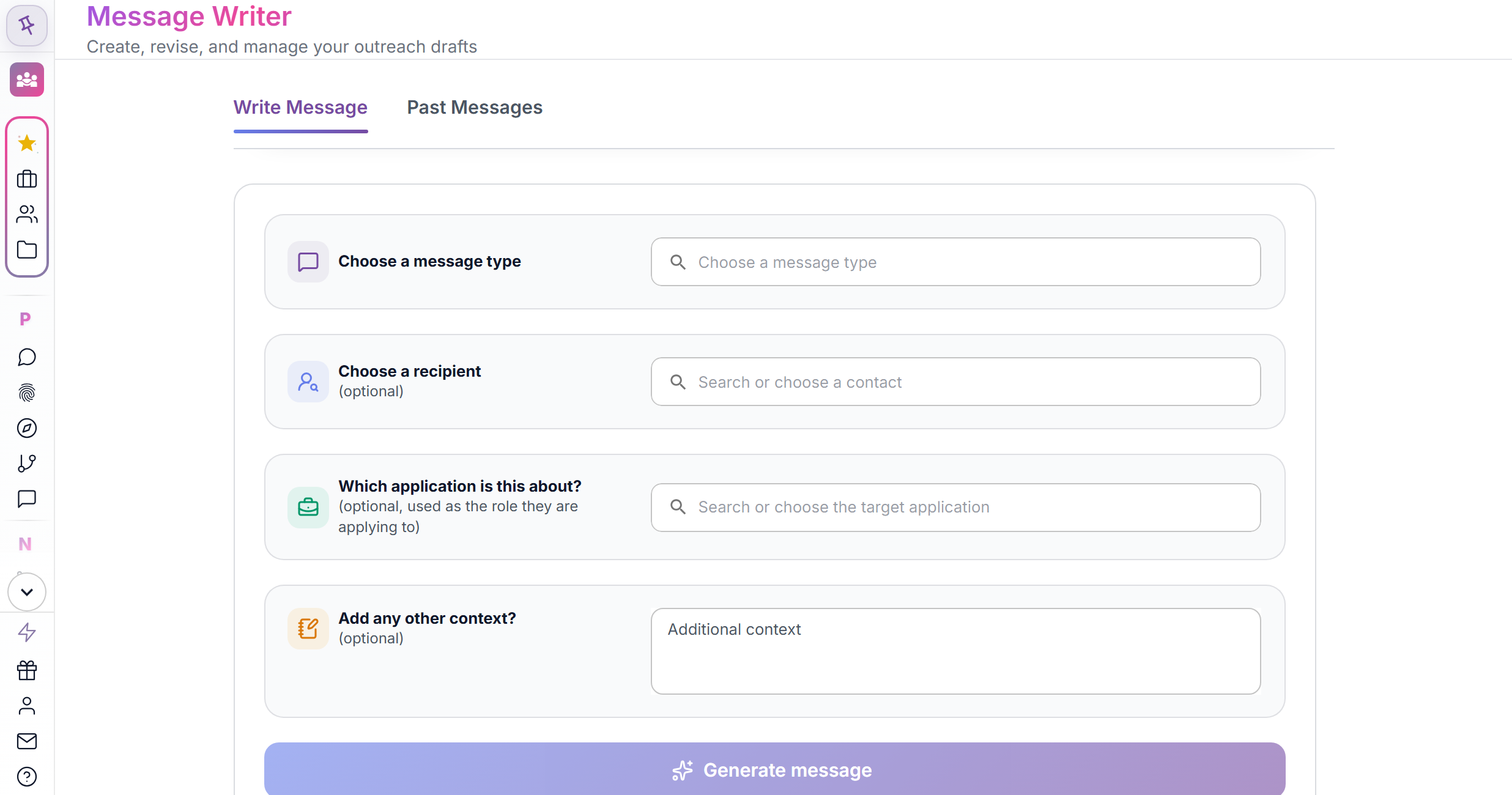
A tool that drafts networking, outreach and follow-up messages with AI, lets you revise them by giving feedback, and keeps your past messages in a list. See the outreach message writer overview.
Does Message Writer send messages for me?
No. It prepares drafts so you can review, edit, copy and send them yourself from your own email or LinkedIn. Marking a message Sent only changes its label.
What kinds of messages can it write?
Messages in twelve categories, including cold outreach, informational interview requests, networking and referrals, interview follow-ups, offer replies and relationship maintenance, or a custom type you describe.
Can I tailor a message to a specific person or job?
Yes. Pick a contact and a tracked application and the draft uses that context. You can also add your own notes of up to 2,000 characters.
Can I change a draft after it is written?
Yes. Edit the text yourself or type revision feedback, and each revision updates the draft in the editor. Drafts autosave.
How many messages can I generate?
Free accounts can generate or revise up to 200 AI messages a day, with 10 requests per minute. Paid plans have no daily cap. Message Writer has its own daily limit rather than the 3 uses a month cap used by resumes, cover letters and similar tools.
Apply
One job at a time: find it, check the fit, tailor the resume, write the letter and the short answers. You review every line and submit every application yourself.
Read more: Job fit analysis, Resume builder, Cover letter generator and Application answer writer.
Better Job Board Search
Open Better Job Board SearchWhat is Better Job Board Search?
A form where you enter a job title, a location and filters once, then open that search on the job boards you choose. Each board opens in its own tab, and the search itself runs on the board's site. The AI job search assistant overview shows where it fits in the workflow.
Which job boards does it cover?
Google Jobs, LinkedIn, Glassdoor, Indeed and ZipRecruiter, plus mission-driven and public-sector boards: ImpactSource, GovSkills, USAJOBS, GovernmentJobs and Idealist. Some boards cannot apply every filter, and an info icon next to each board says what to expect.
Does HiringCoachAI show job listings inside the app?
Not right now. The in-app listing search ran as a beta and is paused, so that tab shows a short feedback form. The Search job boards tab is the working part, and any posting you find can be saved to the Job Tracker from its link.
Which filters can I set?
How recent the posting is (from 24 hours up to any time), work arrangement (any, remote, onsite or hybrid) and employment type (full-time, part-time, contractor, temporary or intern). Not every board supports every filter.
How do I save a job I found to my Job Tracker?
In the Job Tracker, click Add Job and paste the posting link. HiringCoachAI reads the posting and fills in the title, company, location and description for you to review before saving. Pages that need a sign-in or block automated reading, such as Indeed and Glassdoor, ask you to paste the description instead.
Why did my search not open in some tabs?
Browsers often block several new tabs at once. When that happens, a banner shows one link per board so you can open them one at a time.
Fit Analysis
Open Fit AnalysisWhat is Fit Analysis?
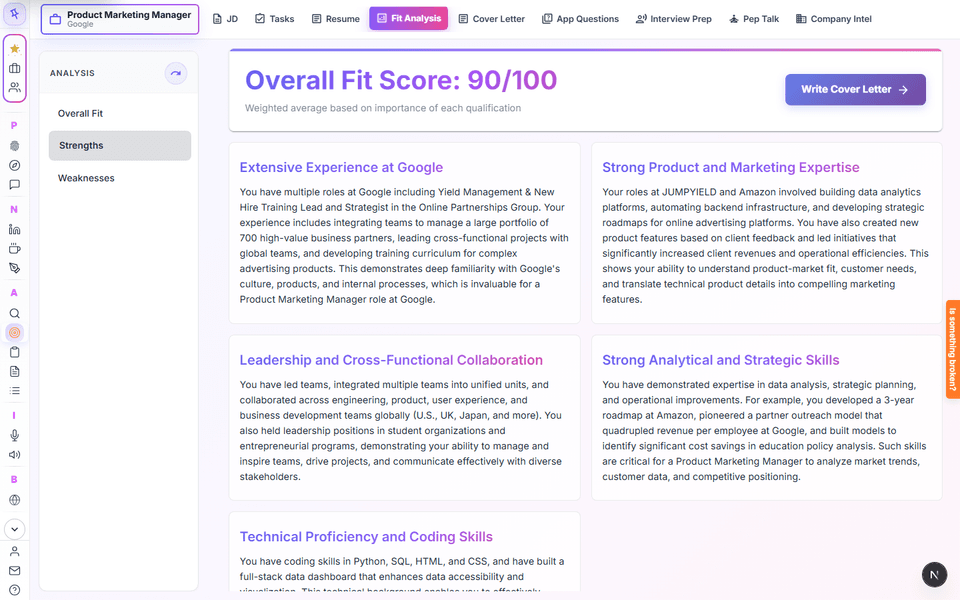
It compares your master resume with a job you saved and returns a score out of 100, evidence and gaps for each requirement, and written strengths and weaknesses. It helps you decide whether a job is worth your time and what to address before applying. See the job fit analysis overview.
How is the fit score calculated?
It is the average of the scores for each requirement in the job description. When the requirements carry importance ratings, it is a weighted average, so the requirements that matter most count most.
What do I need before I can run Fit Analysis?
A master resume and a saved job. If you have no master resume yet, the page asks you to upload one or set one on the Resumes page. It always scores the master resume, not a tailored copy.
Does Fit Analysis count against my free limit?
Yes. Free accounts get 3 fit analyses a month and paid plans have no cap. A meter on the page shows your usage.
Is the same job scored the same every time?
Not exactly. The AI is generative, so a rerun can change the numbers slightly, though the substance should stay about the same. A dialog reminds you of that before a rerun.
Where are my fit results saved?
With the job in your tracker, so you can come back to them without running the analysis again. The Fit column on the Job Tracker shows the score for each job.
Resumes
Open ResumesWhat is a master resume in HiringCoachAI?
The resume the rest of the app uses by default, for Fit Analysis, tailoring, LinkedIn recommendations and interview prep. Your first upload becomes the master, and tailoring copies it first so the master stays untouched. The resume builder overview walks through the workflow.
Which resume file types can I upload?
PDF, DOCX, TXT, JSON and ODT, up to 10 MB. Older .doc Word files cannot be read, so save them as .docx or PDF first. Text is extracted in your browser, and a scanned PDF falls back to text recognition; check the parsed result in the editor afterward.
How does HiringCoachAI tailor a resume to a job?
Choose Tailor To a Job, pick a saved job and click Get Tailored Suggestions. HiringCoachAI copies your master resume under the role and company name, then suggests rewrites for each bullet. For every suggestion you keep one version, edit it or hide it, and a restore arrow brings the original back.
Can I improve a resume without a job description?
Yes. Optimize As Is suggests improvements based on general resume practice, and you review them the same way as tailored suggestions.
Does the AI change my resume without asking?
No. Suggestions appear for you to accept, edit or hide. A draft review shows visibility, clarity and concision scores for the current and proposed wording, with keep or apply for each item and an undo for the whole review.
How can I download my resume?
Export as Word (.docx), PDF, Google Drive (.gdoc), a web page (.html) or plain text. Word and text exports can include the recommendations. A Google Doc export leaves formatting notes in comments.
Will my resume pass an applicant tracking system?
HiringCoachAI cannot promise that. It does not verify how any employer's system reads a resume, and keyword coverage does not prove you have a qualification. What it does is keep your wording clear, specific and tied to the posting.
Do resume suggestions count against my free limit?
Yes. Generating tailored suggestions or duplicating a resume uses one of your resume uses. Free accounts get 3 a month and paid plans have no cap.
What does the step-by-step resume builder do?
It reads a job post, scores your experience against it, chooses your strongest bullets, polishes the wording, writes a summary and assembles a tailored resume. The final review labels each bullet as kept, cut or merged, shows how many of the job's keywords the draft covers, and lets you override any choice.
Can the builder add claims that are not in my resume?
It flags any line that says something your original resume does not, and export stays blocked until you confirm each one is accurate or change it. The result is saved as a separate tailored resume linked to the job; your master is never overwritten.
What is the recruiter-eye review?
An AI read of your resume the way a hiring manager's first skim might go: what sits in the top third, what falls below the fold, phrases that sound AI-written with a suggested rewrite, and claims it cannot find in your source materials. You choose whether to insert any rewrite.
Does the recruiter-eye review use my allowance?
A new review uses one fit analysis from your plan. Reopening an unchanged resume reuses the saved review at no cost; it only regenerates when the resume or its source changes. It is an estimate of what a skim would notice, not a prediction of an interview.
Cover Letters
Open Cover LettersHow does HiringCoachAI write a cover letter?
It starts from your master resume and the job description, then generates options for the opening, the transition, the body paragraphs and the closing. You pick an option for each part or write your own, edit the text in place, and export when it reads like you. See the cover letter generator overview.
How do I start a cover letter?
From the Cover Letters list click Write on a job, or from Fit Analysis use Write Cover Letter. You can also paste a whole listing on the new-letter page and HiringCoachAI separates out the description.
Can I choose the tone or length of the whole letter?
Not currently. You choose an opening and a closing style for those sections and can write your own text anywhere. A whole-letter tone and length control exists in the code but is not switched on.
Does the letter use only my real experience?
The prompts are told to use only facts in your resume and the job description. You should still check every claim and edit the wording before you send it.
Can I regenerate one paragraph?
No. Regenerate restarts the flow and writes a new draft of the whole letter. To change one section, switch to another generated option for it or edit the text directly.
Which formats can I export a cover letter in?
Google Drive (.gdoc), PDF, Word (.docx), web page (.html) and plain text. You can also export every generated option as text to keep for later.
Do cover letters count against my free limit?
Yes. Free accounts get 3 cover letters a month, and paid plans have no cap. At the limit a window offers an upgrade.
Is my cover letter saved?
Yes. One letter is saved per job, linked to that job, and you reopen it from the Cover Letters list or the Job Tracker.
Can I add a story from my Story Bank to a letter?
Yes. Feature a story on the draft screen inserts a story from your Story Bank into the letter.
Can I try the cover letter tool without an account?
Yes. On the cover letter campaign page you upload a resume, paste a job description and get a letter you can edit in the page. The resume, job and letter stay in your browser until you sign in, which you do only to copy or download it; saving then counts as one cover letter use on your plan.
App Questions
Open App QuestionsWhat is App Questions?
A tool that drafts answers to the short questions on job applications, such as "Why do you want to work here?". It writes from your master resume and the job you selected, in several styles you can edit. See the application answer writer overview.
How do I set the answer length?
Enter the form's limit and choose words or characters. The minimum is 10 and the maximum is 1,000 words or 5,000 characters; a counter in the editor turns red when you are over.
Does it make things up about me?
It is built to use only facts that appear in your resume. It first pulls evidence from your resume and notes what the question asks for that the resume does not show, then writes the answers; styles change tone, not facts. Check every answer before you use it.
Does App Questions submit my answers?
No. You copy the answer into the application and submit it yourself.
Can I reuse an answer for another job?
In the web app, answers are saved with the job you selected. To reuse wording for another job, copy it or generate again for the new job. The Chrome extension can suggest similar saved answers while you fill a form.
Interview
From the first practice question to the offer letter. Practice on camera or by typing, brief yourself on the company, keep your proof stories, debrief a real interview and work out the offer.
Read more: Interview prep, Company intel and Offer negotiation.
Interview Prep
Open Interview PrepWhat is HiringCoachAI Interview Prep?
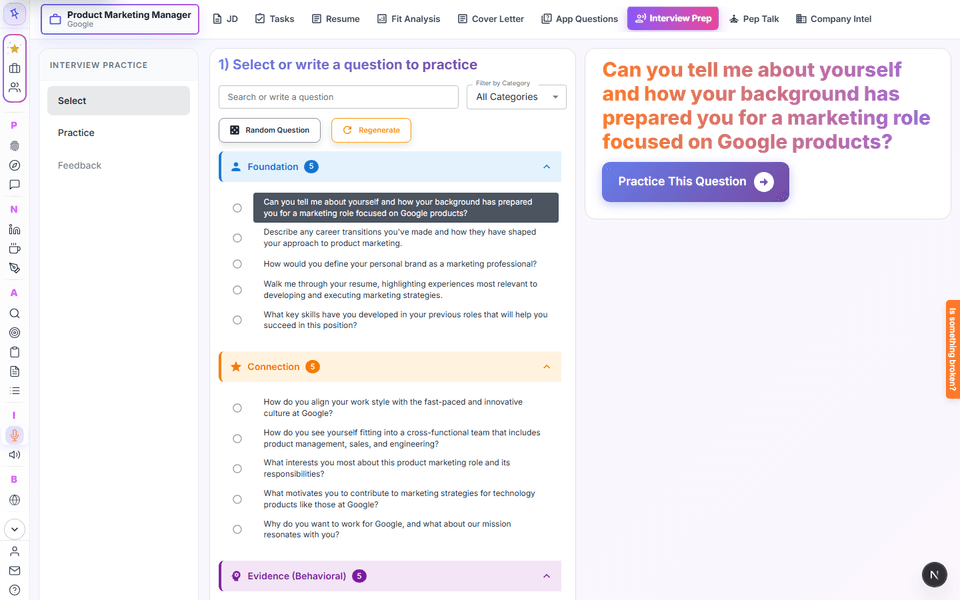
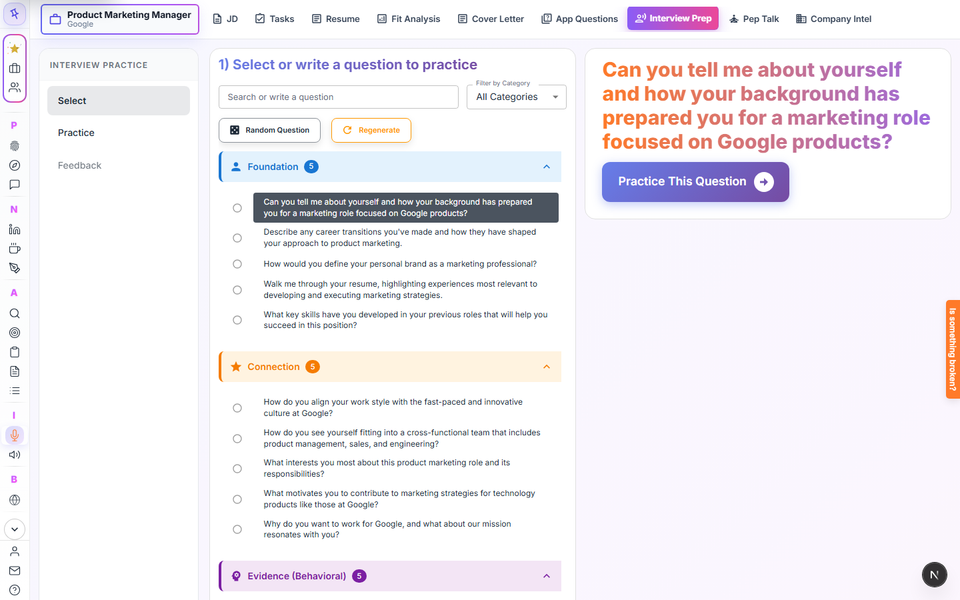
A practice tool that writes interview questions from a job you saved and your master resume. You answer on camera, by audio or by typing, and it scores the answer, suggests fixes and measures your delivery. See the interview prep overview.
Where do the practice questions come from?
They are generated from the job description you saved and grouped into Foundation, Connection, Evidence (Behavioral), Evidence (Technical), Vision and Close. You can search, filter, write your own questions, or regenerate the set.
Do I have to record video?
No. Practice on camera, with audio only, or by typing, and nothing records until you press Start recording. You can add think time of 15, 30 or 60 seconds and an answer limit of 1 to 3 minutes to mimic a real interview.
What does the feedback include?
An answer score with a rubric, one strength, up to three ranked fixes that quote your own words, a situation-task-action-result check, a stronger version of your answer built from your facts, and a focus for the next take. Spoken takes also get pace, filler words, pauses, vocal variety and length measured against target ranges.
Does it judge my emotions or confidence?
No. HiringCoachAI does not detect emotion, confidence or personality. The score is based only on what you said. Optional on-camera estimates such as looking toward the lens run in your browser, keep only summary numbers, and never change a score.
Are my practice recordings private, and can I delete them?
Recordings go to a private library that only you see unless you share a take with a connected coach. You can delete a take, delete all recordings, turn saving off, or keep recordings for 30 days, 90 days or until you delete them. A take you mark as best is kept whatever the setting.
How much interview practice does the free plan include?
3 scored answers a month and 3 interview outlines a month; paid plans remove those caps. Generating question sets has its own allowance of 30 runs a day on free access.
How long can a practice answer be?
A recorded take can run up to 4 minutes, and the transcript is what gets scored, so you can review or edit it before asking for feedback.
Can I try Interview Prep before I create an account?
Yes. On the interview prep campaign page a visitor adds a resume and a job description, gets tailored questions and practices an answer. Scored feedback needs an account; when you sign up or sign in, the practice moves into it. Unclaimed practice expires after 30 days.
Can my coach see my practice?
Only if you have a connected coach with interview prep access and you choose to share a take. You share one take at a time; the coach sees its recording, transcript, scores and feedback but not your private notes, and you can stop sharing at any time.
Company Intel
Open Company IntelWhat is Company Intel?
It builds a pre-interview briefing for one of your tracked jobs, combining the job description, your master resume and web research about the company. Inside the app the page is titled Interview Intel. See the company intel overview.
What is in a Company Intel briefing?
A 60-second snapshot, your 60-second story, a game plan, your fit and challenges, STAR stories, questions to ask and the role decoded. From web research it adds company background, market and competitors, culture, compensation context, risks, an interviewer prep guide and a list of sources.
Where does the company information come from?
From web research run when you generate the briefing. The Sources section lists the URLs it relied on, and when public information is thin the briefing says so. Verify details before relying on them; it speeds up research and does not replace your own.
What do I need to use Company Intel?
A signed-in account, a master resume and a tracked job with a job description.
Story Bank
Open Story BankWhat is the Story Bank?
A place to keep your proof stories in situation, task, action, result format so you can reuse them in interviews, cover letters and application answers.
How does HiringCoachAI draft stories for me?
Generate from my resume reads your master resume and your value proposition data and writes draft STAR stories. Where your material does not support a detail, it leaves a fill-in placeholder instead of making something up, and each draft lists its sources and questions to answer.
Can I write my own stories?
Yes. New story takes a title, situation, task, action and result, and every field of a generated draft can be edited too.
What does a story need before it counts as Ready?
Every placeholder has to be filled in. The Ready switch stays off while any "[Add: ...]" placeholder remains, and you can tag each story with up to four competencies such as Leadership or Collaboration.
Can I use a story in a cover letter or an application answer?
Yes. Feature a story in Cover Letters and Insert a story in App Questions list your stories with best-match hints, and a story already added cannot be added twice.
Interview Debrief
Open Interview DebriefWhat does Interview Debrief do?
You paste the text of an interview you already had, and HiringCoachAI returns a question-by-question analysis with a score, your edge, your core gaps, a stronger version of each answer and homework for the next round. It is saved to the job the interview was for.
Can I upload the audio or video of my interview?
No. Only pasted text is analyzed. HiringCoachAI does not connect to Zoom, Teams, Meet, Granola or Otter for this tool; you copy the transcript and paste it.
Which transcript formats work?
Plain text, with or without speaker labels. Labels such as "Interviewer:" and "Candidate:", timestamps and WebVTT voice tags are recognized. A transcript must be between 200 and 120,000 characters; split a longer one into parts.
Does it measure my pace and filler words?
From the text only. Talk share, words per answer and filler phrases are counted from the words in your transcript; pace and pauses are worked out only when the transcript has timestamps. They are counts from text, not audio measurements, and it never reads emotion or confidence.
How can I trust the quotes in the analysis?
Each quote is checked against the text you pasted. A quote that is not in your transcript is removed and the report says so, and every quote it can locate links to the matching line in your transcript view.
Can it track my progress between interview rounds?
Yes, for the same job. It compares up to your three most recent analyses for that job, labels each core gap as new, recurring, improved or not assessed, and shows the score change since the last round. The labels are the AI's comparison, not a measurement.
How many debriefs can I run on the free plan?
10 analyses a day on free access and no daily cap on paid plans. It is not part of the 3 uses a month list.
Offer Negotiation
Open Offer NegotiationCan HiringCoachAI help me negotiate a job offer?
Yes. You define what a good outcome looks like, enter the offer and answer a short leverage check, and the workspace builds a plan of up to three prioritized asks, each with a rationale, a risk level and a fallback. See the offer negotiation overview.
Does it tell me what the role should pay?
Not on its own. A numeric range shows only when the role and location match a source-backed benchmark. Otherwise the workspace links public references such as BLS OEWS, O*NET, Levels.fyi and Glassdoor so you can check the market yourself, and it never invents a range.
What do I actually say to the recruiter?
The workspace drafts email, phone and follow-up language in a warm, neutral or firm tone, plus responses to common pushback. Tone changes the phrasing, not the ask, and every draft is yours to edit, copy or download as a PDF plan.
Does HiringCoachAI send the negotiation message for me?
No. You copy the script and send it yourself, then mark it as sent so the tracker and closeout steps open up.
Do I need a resume or a saved job to use Offer Negotiation?
No. It needs only a signed-in account. A Scenario menu offers sample offers to try, and Offer Comparison can carry an offer across with Negotiate this offer.
How does it value equity?
Equity is shown separately as annualized equity and is not treated as cash, so Year 1 cash and Year 1 value are separate tiles.
Offer Comparison
Open Offer ComparisonWhat does Offer Comparison do?
It lines up two to four job offers, and optionally your current job, in one table. For each it works out a pre-tax first-year total and a four-year average from the numbers you enter, with a Show math switch that lists every formula.
Does it include stock options and RSUs?
Yes. Enter RSUs as a total grant value or as shares and price. Options are valued at the spread between share price and strike price, and vesting years and the cliff are part of the calculation.
Does it calculate my take-home pay or taxes?
No. All figures are pre-tax, and the tool does not compare taxes, take-home pay or cost of living.
Can it tell me which offer to accept?
No. It ranks offers using the importance weights and scores you set yourself for pay, growth, flexibility, team, mission and stability. The optional AI summary describes tradeoffs neutrally and avoids recommending an offer.
Pep Talks
Open Pep TalksWhat is a pep talk in HiringCoachAI?
A short motivational script written for a specific job you picked, using your master resume and that job, and read aloud in a voice you choose. It is meant to help you feel energized before an interview.
What do I need before I can generate a pep talk?
A master resume and a saved job. Without them the page asks you to upload a resume or add a job description first.
Can I change the voice or download it?
Yes. Pick a different voice and the audio is regenerated, change the visualizer and the playback speed, download the audio as an MP3, or render the visualizer and audio into a video in your browser.
What is the Shark Tank pitch?
An alternate version where a narrator pitches your story. It is saved separately from your standard pep talk.
Resources
The reference shelf in the sidebar. Prompts to take to any assistant, a reading list, a directory of help for people between jobs, and guides to the privacy settings of the AI tools you already use.
Read more: Prompt Library, Book recommendations, Transition Assistance Hub and Privacy Tools.
Prompt Library
What is the HiringCoachAI Prompt Library?
A set of ready-made prompts for job search tasks such as finding your skills, exploring sectors, shortening a long CV and checking a resume for claims you cannot support. You copy a prompt and paste it into an AI assistant of your choice; the prompts do not run inside HiringCoachAI. See the Prompt Library.
Is the Prompt Library free?
Yes. You can browse and copy prompts without paying or signing in. Signing in keeps your favorite prompts across devices.
Which chat assistants do the prompts work with?
Each prompt card names the assistants it suggests, currently ChatGPT, Claude, Gemini and Perplexity. You can try a prompt in another assistant too.
Book Recs
What is Book Recs?
A curated reading list for the job search, from preparing before interviews to starting a new role, grouped into the founder's personal picks, other recommendations and a section called After The Offer. Each book is tagged by job search stage. See book recommendations.
Can I buy the books from the page?
Each book has a purchase link to the seller. Checkout happens on the seller's site, not on HiringCoachAI.
Transition Assistance Hub
What is the Transition Assistance Hub?
A page of links to outside help for people between jobs: unemployment benefits, health coverage, food, housing, utilities, child care, legal help, veteran benefits and a 24/7 crisis line. You pick your state and open the card you need. See the Transition Assistance Hub.
Does HiringCoachAI file for unemployment for me?
No. The hub sends you to the official or nonprofit site for each program. You apply there, that program decides eligibility, and nothing on the page is legal or financial advice.
Is the hub only for people who were laid off?
No. It is useful for anyone between jobs, including after a layoff, a federal transition or a career change. Which program fits depends on your own situation.
What are the pages for USAID, State Department, UN and Peace Corps professionals?
Landing pages with career-transition resources for those communities and, for some groups, a community offer. A community offer lowers the price for an eligible group; it does not change the product, create employer preference or help you get hired, and standard access stays available to everyone without a code.
Privacy Tools
What are the Privacy Tools?
Step-by-step guides, with short videos, for turning off model training and data retention in ChatGPT, Gemini, Claude, Copilot and Perplexity, plus a short statement of how HiringCoachAI handles your content. See Privacy Tools.
Free tools
Five tools that run from a public page with no account, and none counts against a plan. The resume match score automatically stores a temporary job-description and result record, which excludes resume text.
Read more: Resume match score, LinkedIn profile score, Recruiter Scam Check, Hidden jobs search builder and Role pages.
Resume match score
What is the free resume match score?
A tool where you paste your resume and a job link or description and get a keyword match score, the keywords you are missing, and up to two example bullet rewrites that only rephrase your own text. It needs no account: resume match score.
What does the match score measure?
How many of the job's keywords appear in your resume. It is a keyword match, not a simulation of any employer's applicant tracking system and not a prediction of how a recruiter will rate you.
Is my resume saved by the match score tool?
Resume text is excluded from the temporary result record. After a successful check, the tool automatically saves the job description, any job URL, score, band and keyword lists with a 24-hour expiry. This happens without an account or a separate save action, so you can save the result to an account later.
LinkedIn profile score
What is the HiringCoachAI LinkedIn profile score?
A profile readiness score from 0 to 100 with findings by section, a ranked list of what to fix first and suggested rewrites, based on a rubric written by HiringCoachAI. It is free and needs no account: LinkedIn profile score. Separate headline and About section checkers score one section at a time.
Does the LinkedIn score connect to my LinkedIn account?
No. You bring your profile in yourself by uploading LinkedIn's Save to PDF file or data export, pasting sections, or using the HiringCoachAI browser extension. HiringCoachAI never reads, scrapes or logs in to your LinkedIn account, and it is not affiliated with or endorsed by LinkedIn.
Is my LinkedIn profile text stored?
No. On the public page the profile is scored in memory and discarded; only scores and check statuses are kept for 24 hours so you can save the result to a free account. Signed-in history keeps scores and statuses, never profile text.
Why do some sections say not assessed?
Only what could be read or what you told the tool is scored. A section that was not imported is left out of the total rather than counted as missing, and LinkedIn's PDF leaves out the photo, banner and Featured section, so the tool asks about those instead. There is no photo upload or image analysis.
Recruiter Scam Check
What does the Recruiter Scam Check do?
You paste a recruiter's message, phone number, email or website and it lists common job scam signals it finds, with a reason for each: a move to a chat app, a check to deposit, an upfront fee, crypto or gift card payment, pressure to act fast, a free mail address, a very new or lookalike domain, or a VoIP phone line. Try the Recruiter Scam Check.
If the scam check finds nothing, is the recruiter legitimate?
Not necessarily. The best result reads "No common scam signals found. Still verify independently." It shows signals only, never a verdict, and grammar or spelling mistakes are never used as evidence.
Plans and billing
What is free, what Pro costs, how to cancel, and the two programs that reward sharing. Prices on this page come from the same data as the pricing page.
Read more: Pricing, Pricing FAQ, Refer a friend and Affiliate program.
Free and Pro
Is HiringCoachAI free to use?
Yes, to start. The free plan costs $0, needs no card, and includes 3 uses a month of each capped tool. Pro removes those monthly caps. See pricing for the plans side by side.
Which tools get 3 free uses a month?
Tailored resumes, cover letters, LinkedIn recommendations, short answers, interview outlines, interview scores, pep talks and fit analysis each get 3 uses a month. The cap is per tool, so using up resumes does not use up cover letters. Other tools have their own daily limits or none, as noted in their sections above.
What does HiringCoachAI Pro cost?
Pro costs $9 billed weekly, $29 billed monthly, $74 billed quarterly or $179 billed yearly, in US dollars. Per day that works out to weekly about $1.29, monthly about $0.97, quarterly about $0.82, yearly about $0.49. Monthly is the plan preselected at checkout.
What does Pro give me that free does not?
Pro keeps the same job seeker tools as the free plan and removes the monthly usage caps on them. There are no Pro-only tools. Normal safeguards such as file size limits, request duration and abuse protection still apply on every plan.
Is there a free trial on Pro?
No. HiringCoachAI does not offer a free trial on Pro right now. Start on the free plan with no card, use each tool up to 3 times a month, and move to Pro when you are ready.
Do I need a credit card to sign up?
No. A card is needed only when you buy Pro, and Stripe handles the card details.
Billing and cancellation
How do I cancel my subscription?
Open your account, go to Plans and choose Cancel Plan, which turns auto-renew off. You can turn it back on from the same place. Cancelling stops future renewals and takes effect at the end of the current paid period, so you keep access until then.
Does Pro renew automatically?
Yes. Pro renews at the end of each billing period at the then-current price until you cancel. The terms promise advance notice of any price change before it takes effect, applied at your next renewal, with the right to cancel first.
Can I get a refund?
Payments already made are non-refundable and there are no partial-period refunds, except where the law or a stated policy requires one. If you believe you were charged in error, use the contact page. The separate coach refund policy covers coaching services bought from an independent coach, not your HiringCoachAI subscription.
How is my payment handled?
Stripe handles your card details directly through its checkout. HiringCoachAI receives billing identifiers and status information, not your card number, and raw card data is never stored in its database.
What happens if my payment fails?
Your account shows a past-due notice and you receive a payment-failure email, both pointing to the Plans section of your account, which lists your options. Contact support if you need help.
Refer a friend
Open the referral FAQHow does the HiringCoachAI referral program work?
Share the personal link from Account, then Refer a friend. When a friend creates a new account through it and makes their first full payment, you get 30 days of premium access added to your account. The referral FAQ and the referral program terms have the full rules.
What does my friend get?
Their first month of Pro Monthly for $1 instead of $29, once, with no code needed. It then renews at the normal price and they can cancel any time. The offer applies to the monthly plan only.
When do I earn my referral reward?
When your friend makes their first full payment. Signing up alone, or paying only the $1 first month, does not earn it. Rewards are normally applied within minutes, and you can earn up to 12 in a rolling 365 days.
Is the referral reward cash?
No. It is premium access on your account, with no cash value, and it cannot be transferred or sold.
Affiliate program
Open the affiliate programDoes HiringCoachAI have an affiliate program?
Yes. Creators, coaches and publishers who reach job seekers can apply on the affiliate program page. Approved affiliates earn a commission on referred paying customers. It pays cash and is separate from the credit-based friend referral program.
How much is the affiliate commission?
25% of the referred customer's first qualifying payment, paid once per customer. A qualifying payment is a successful subscription charge of at least $5 after discounts; renewals, upgrades, prorations, coach plans and institutional plans do not earn more.
Who can join the affiliate program?
Adults who live in the United States and hold a HiringCoachAI account in good standing. The program is US-only, one account per person, and approval is at HiringCoachAI's discretion.
How long does affiliate tracking last?
A first-party cookie lasts 90 days from the click, the last affiliate link clicked wins, and the sign-up must be confirmed within 7 days of account creation. Cleared cookies, private browsing or switching devices can stop attribution.
When and how are affiliates paid?
A commission clears 60 days after it is recorded. Once your cleared balance reaches $50 it is paid in US dollars by transfer to a Stripe account you open through HiringCoachAI after completing Stripe's identity and tax setup. Payouts are aimed at least monthly with no guaranteed date.
What if an affiliate referral gets a refund?
A full refund, chargeback or dispute before payout cancels that commission. A partial refund does not cancel it, though it can be reviewed.
Can I run ads for my affiliate link?
Paid ads are allowed, but not bidding on HiringCoachAI brand terms. Coupon sites, spam and referring yourself are not allowed, and you must disclose that you earn a commission. Each new customer is credited to only one of the affiliate and friend referral programs.
Account and your data
Passwordless sign-in, optional two-step verification, and the export and delete controls that are yours to use at any time.
Read more: Security overview and Trust Center.
Signing in
How do I sign in to HiringCoachAI?
With Google, with LinkedIn, or with an email sign-in link sent to your inbox. There is no password to create. Start at the sign-in page.
How do I reset my password?
There is no password. HiringCoachAI is passwordless, so request a new email sign-in link, or sign in with Google or LinkedIn. If a link does not arrive, check spam and wait a minute before requesting another.
Does HiringCoachAI support two-step verification?
Yes, as an opt-in setting. Turn on authenticator app protection in the Security tab of your account, using an app such as Google Authenticator, 1Password or Authy, and you receive ten one-time backup codes. Turning it off needs a code from the app or a backup code.
What if I lose my authenticator phone?
Use one of your ten backup codes to sign in. If you have lost both the device and the codes, contact support through the contact page.
How do I sign out of all devices?
Open Active sessions in your account and choose Sign out of all devices. Every existing session is invalidated and you sign in again on each device. HiringCoachAI does not keep a per-device list, so use this if you suspect someone else has access.
Can I change my account email?
Yes, from Account details. A verification email confirms the change, its link expires after 30 minutes, and other sessions are signed out once the change is made.
Export and delete
Can I download my data?
Yes. Go to Account, then Export my data, to download a JSON archive with your profile and preferences, subscription history, resumes, cover letters, interview content, and your tasks and labels. Large accounts can take a minute.
How do I delete my HiringCoachAI account?
Open Account, choose Delete my account and confirm the steps. Your profile and content are removed from active product systems, you are signed out everywhere, and any active subscription is cancelled first. It cannot be undone through the product, so export your data first if you want a copy.
What does HiringCoachAI keep after I delete my account?
Limited audit, billing and legal-retention records. Billing records can be kept up to 7 years for tax and dispute reasons, a deletion audit record without your content is kept for a year, and your name and email stay visible to restricted administrators for up to 30 days in case you left deletion feedback. Older copies in backups roll off as the backup window rotates.
Do I get a confirmation after deleting?
Yes. An email is sent once the deletion completes, and you can optionally say why you left.
How do I make a privacy request?
Use the export and delete pages in your account, or write to the privacy address listed in the privacy policy. Requests are answered within 30 days, extendable by 60 for complex ones.
Privacy and AI
Where your data lives, which AI providers see what, what is never trained on, and the pages where every claim is written down.
Read more: AI use disclosure, Privacy policy, Security overview and Trust Center.
How AI is used
Does HiringCoachAI use AI?
Yes. The resume, cover letter, interview, fit analysis and similar tools use AI to draft and analyze based on what you provide. The AI use disclosure lists each AI feature and the data it sends.
Which AI providers does HiringCoachAI use?
OpenAI is the main text model provider. Perplexity supports optional company research, and ElevenLabs, Deepgram and Google Cloud Text-to-Speech handle voice features. The sub-processors list names every vendor.
Is my resume used to train AI models?
No. HiringCoachAI does not train models on your career content, and it relies on each provider's standard API terms, under which API content is not used for training by default.
Does the AI provider keep my data?
HiringCoachAI asks OpenAI not to store responses, but it has no zero-retention agreement, so OpenAI's standard retention of up to 30 days for abuse monitoring applies. HiringCoachAI's own AI logs record metadata such as model, token counts and timing, never your prompts or the responses.
Can I trust the AI output as final?
No. Treat drafts, scores and suggestions as aids and review them before using them. Nothing is sent to anyone without your action, and HiringCoachAI makes no hiring decisions and is not used by employers to screen candidates.
Can I turn AI off?
There is no global switch. You avoid AI by not using the AI-assisted features; manual editing, file storage and account settings never call AI. Some flows run AI in the background, for example a fit analysis when a job description is saved.
Security and privacy
Is my data secure on HiringCoachAI?
Data is hosted on Google Cloud (Firebase) and Vercel in the United States, served over HTTPS with HSTS, and encrypted at rest by the platform with AES-256. The security overview lists the controls in place today and the ones still on the roadmap.
Does HiringCoachAI sell my data?
No. HiringCoachAI does not sell personal data and does not share it for cross-context behavioral advertising unless you consent through the cookie banner.
Where is my data stored?
In Google Cloud (Firebase) services with a primary region in the United States. The data map in the Trust Center inventories every collection, its retention and its processors.
Who else processes my data?
Vendors such as Stripe for payments, SendGrid and Mailchimp for email, the AI providers above, and consent-gated analytics tools. The full sub-processor list is in the Trust Center, and advance notice of new sub-processors is available on request.
Does HiringCoachAI follow GDPR and CCPA?
The privacy policy sets out GDPR rights (access, correction, deletion, portability, objection and withdrawing consent) and California CCPA and CPRA rights, answers requests within 30 days, extendable by 60, and uses standard contractual clauses where required.
Is HiringCoachAI SOC 2 certified?
No. Its hosting vendors hold SOC 2 Type II attestations, and HiringCoachAI inherits those infrastructure controls without claiming its own certification. Payments stay with Stripe, so HiringCoachAI is in the lightest PCI scope.
How do I report a security problem?
Use the responsible disclosure page, which explains what to send and how it is handled.
Is HiringCoachAI accessible?
HiringCoachAI reports WCAG 2.1 Level AA conformance with a published VPAT, a skip link, keyboard operation and reflow at 320 pixels wide. Screen-reader testing on every route is still expanding, and the accessibility statement lists known limitations and a feedback address.
Coaches and organizations
HiringCoachAI is software you run yourself. Independent coaches and partner organizations can use it with you, on terms you control.
Read more: Coach directory, HiringCoachAI for coaches and Coach FAQ.
Finding a coach
What is the HiringCoachAI coach directory?
A public list of independent career coaches who have published a profile on HiringCoachAI. You can search and compare the details each coach chose to publish, then open a full profile. Browse the coach directory without an account.
Are the coaches HiringCoachAI employees?
No. Coaches are independent professionals who use HiringCoachAI software. They run their own practices under their own names, set their own prices and contract directly with clients. HiringCoachAI does not supervise, vet or guarantee any coach.
How are coaches ordered in the directory?
Alphabetically by display name. Coaches cannot pay for a higher position, and payments, ratings and review volume are not used to order the list. There are no public star ratings or reviews.
Does HiringCoachAI recommend or verify coaches?
No. A "Directory listed" label only means the profile met the listing conditions. Credentials are self-reported unless a profile field says otherwise, so check what matters to you and read the full profile before deciding.
Who sets the price for coaching?
The coach. HiringCoachAI does not set or cap coach prices, and your agreement is with the coach, not with HiringCoachAI.
Working with a coach
What is the Coaching Hub?
The workspace for people who have a coach on HiringCoachAI. It brings together your goals, assignments, sessions, shared materials, messages and agreements with that coach, and a selector lets you switch between coaches if you have more than one.
Does it cost extra to be a coach's client on HiringCoachAI?
HiringCoachAI adds no workspace charge for accepting a coach's invitation. You may owe your coach for coaching under your own agreement with them.
What can my coach see in HiringCoachAI?
Only what you share, in six categories: workspace and assignments; applications and job research; resume, LinkedIn and positioning; contacts and message drafts; interview prep; and cover letters and written answers. You can change any category in Coach settings after you accept, and a coach who needs more can only send a request you approve, in full or in part.
What can my coach assign me?
Homework that opens an in-app exercise: practice interview answers, a tailored resume for a job, or a set of networking messages. You do the work in HiringCoachAI and the assignment completes when you finish. Messages are sent by you, never automatically.
Can I see my coach's private notes?
Coach-private notes are coach-only in normal product use and are not part of your account export. One coach cannot see another coach's clients.
What happens to my data if I end a coaching relationship?
The relationship leaves the active roster. The coach chooses whether to export, delete or retain their qualitative records, and some records and shares may remain, so ending a relationship does not automatically delete everything.
Can I pay my coach through HiringCoachAI?
Not yet. HiringCoachAI-collected client payments are built but are not taking live payments today, and when they do, they are limited to US coaches and US clients in supported states. Your coach will tell you how they collect payment, and they may record payments taken outside HiringCoachAI.
What is the refund policy for coaching bought through HiringCoachAI?
When HiringCoachAI-collected payments are live, a client can request the full remaining refundable amount within 30 calendar days of each charge without giving a reason, and the coach funds the refund. That policy covers coaching services, not your own HiringCoachAI subscription.
For coaches
How much does the Coach plan cost?
$99 a month or $999 a year, for one coach with unlimited clients. It unlocks client invitations, the client workspace, materials sharing and the rest of the coach tools. Confirm the price at checkout, since prices can change. The coach FAQ covers the details.
Does HiringCoachAI take a cut of what clients pay a coach?
The current HiringCoachAI platform fee on client payments is 0% on the Coach plan unless a different rate is disclosed to the coach. Stripe's processing fee is a separate coach expense.
Can a coach cancel the Coach plan?
Yes, from Coach billing. The plan stays active to the end of the paid period with no partial refund, and active client relationships then get a seven-day grace period before they end.
How does a coach get listed in the directory?
By publishing a profile that meets the listing conditions: an authorized coach role, an approved directory status, and no hidden or suspended state. Automated content checks run on profiles, listing is not an endorsement, and coaches cannot pay for placement.
Schools and organizations
What is the HiringCoachAI Partner Program?
It lets an organization such as a university career center, fellowship or transition program receive a pool of seats and give them to the people it serves. Each organization has a named Partner Success Manager from HiringCoachAI, and terms are set with the organization through the contact page.
Can a partner organization see my resume?
No. Partner reporting covers usage, such as activation and active minutes, never resume text, cover letters, answers or documents. Outcome counts appear only if you opt in, only as an aggregate for groups of five or more, and only when HiringCoachAI has turned that report on.
Support
How to reach a person, which address handles what, and what the answer will not promise.
Read more: Contact page and Responsible disclosure.
Reaching HiringCoachAI
How do I contact HiringCoachAI support?
Use the contact page, which has a Send a Message form and a Talk to the Founder option for booking a call, or write to the support address shown at the bottom of this page. Include a screenshot or the job posting link when something is not working; it speeds up the reply.
How fast will I get a reply?
A response time is not published, so none is promised. There is no phone line and no 24-hour support desk.
Where do I send a privacy or data request?
Use the export and delete controls in your account for the common cases, or write to the privacy address listed in the privacy policy. Requests are answered within 30 days, extendable by 60 for complex ones.
Where do I report a security problem?
Follow the responsible disclosure page, which lists the security address and what to include.
How do I report a problem with a coach profile?
Use the report control on the profile page, or write to support through the contact page with the profile link and what you saw.
Where do press and partnership inquiries go?
Press inquiries go to the press contact listed in the press section of the About page. University, career center and organization partnerships start from the contact page.
How do I report a mistake on this page or in a guide?
Ask it in the box below with the page and the statement, or use the corrections route on the editorial standards page. Confirmed problems are fixed, noted with a dated correction, or withdrawn.